Optimise your digital marketing workflow for brand reach
TL;DR:
- A structured digital marketing workflow improves efficiency and accountability across campaign stages.
- Essential tools include project management, automation, analytics, content planning, and communication platforms.
- Regular review and documentation are key to maintaining a reliable, scalable marketing process.
Juggling paid ads, social content, SEO reporting, and email campaigns simultaneously is the daily reality for UK marketing managers. Without a clear system connecting each activity, teams duplicate effort, miss deadlines, and struggle to prove return on investment. A structured digital marketing workflow solves this by turning scattered activity into a repeatable, measurable engine. This guide walks you through every practical step, from defining the right tools to building approval chains and tracking performance metrics that genuinely move the needle for your brand.
Table of Contents
- What is a digital marketing workflow and why does it matter?
- Essential tools and components for smooth workflows
- Step-by-step guide to building your digital marketing workflow
- Troubleshooting and optimising your marketing workflow
- Why most digital marketing workflows fail (and how to get yours right)
- Get expert support to supercharge your digital marketing workflow
- Frequently asked questions
Key Takeaways
| Point | Details |
|---|---|
| Workflow clarity matters | Well-structured workflows reduce chaos and drive consistent marketing outcomes. |
| Right tools boost efficiency | Choosing suitable project management and automation software is essential for scalable success. |
| Human checks prevent errors | Human oversight ensures unusual cases don’t derail campaigns or skew results. |
| Measure and improve | Use metrics like CPA and ROAS to continuously track performance and refine your process. |
What is a digital marketing workflow and why does it matter?
A digital marketing workflow is a step-by-step system that governs how campaigns are initiated, executed, reviewed, and measured. Think of it as the operating manual for your marketing team. Rather than relying on informal conversations or email threads to coordinate, every task has a defined owner, a deadline, and a clear next step.
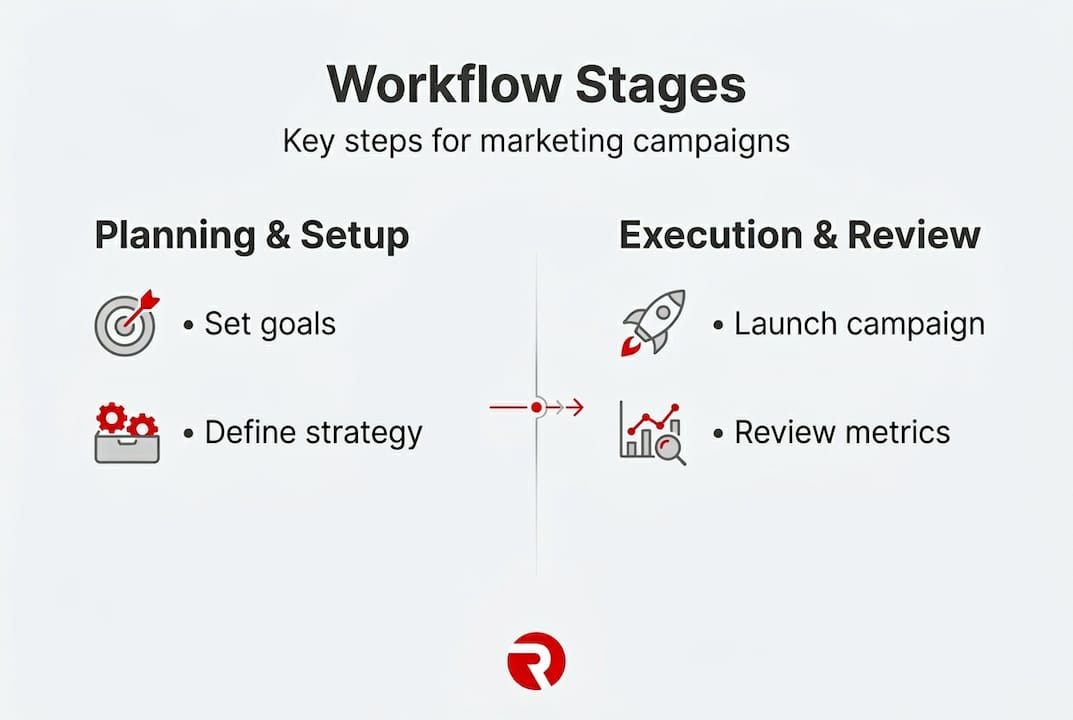
The core components of a well-designed workflow break down into five stages. First, planning, where objectives are set and resources are allocated. Second, asset creation, where copy, visuals, and code are produced. Third, campaign launch, where assets go live across channels. Fourth, monitoring, where performance data is collected in real time. Fifth, iteration, where insights inform the next cycle. Each stage feeds into the next, creating a loop rather than a linear dead end.
The business value is significant. A workflow aligns your team around shared goals, reducing the kind of miscommunication that causes assets to miss brand guidelines or campaigns to launch with broken tracking links. It also reduces wasted spend. Without a clear process, budget can drain into poorly targeted ads that were never reviewed against your internet advertising strategies before going live. Following content workflow tips can significantly cut production time and improve output quality.
Consider the difference between ad hoc and workflow-driven marketing:
| Area | Ad hoc approach | Workflow-driven approach |
|---|---|---|
| Campaign planning | Reactive, last-minute | Scheduled and goal-aligned |
| Asset approval | Informal sign-off via email | Defined approval chain |
| Performance tracking | Sporadic and inconsistent | Automated and regular |
| Budget management | Reactively adjusted | Proactively monitored |
| Team accountability | Unclear ownership | Role-defined responsibilities |
Importantly, modern workflows now incorporate AI autonomous management, shifting roles to strategy while automation handles repetitive execution tasks.
Signs your marketing needs a workflow overhaul:
- Campaigns regularly launch late or without proper review
- Team members duplicate tasks or contradict each other’s work
- Performance data is collected inconsistently or not at all
- There is no clear owner for specific campaign stages
- Budget decisions are made without reference to live data
- Reporting takes hours rather than being near-instant
If three or more of these sound familiar, your marketing operation will gain immediate, tangible benefit from implementing a structured workflow.
Essential tools and components for smooth workflows
With the value and structure established, let’s explore what you’ll need at hand to build a workflow that truly delivers.
The technology stack behind an efficient digital marketing workflow falls into five categories. Project management platforms such as Asana, Monday.com, or Trello give your team a shared view of tasks, deadlines, and progress. Marketing automation tools like HubSpot or ActiveCampaign handle email sequences, lead scoring, and triggered campaigns without manual intervention. Analytics platforms including Google Analytics 4 and Looker Studio consolidate data from multiple channels so reporting is fast and accurate. Content calendar software such as CoSchedule or Notion organises publishing schedules and asset deadlines. Communication platforms like Slack or Microsoft Teams keep conversations tied to specific tasks rather than lost in inboxes.

Beyond technology, team structure matters equally. Every workflow needs defined roles at each stage. A content creator should not also be the final approver of their own work. Build in a dedicated review and approval layer, particularly for paid campaigns where errors are costly.
The attribution workflow guide is essential reading for connecting tool outputs to meaningful business outcomes. Understanding which touchpoints drive conversions requires deliberate setup within your workflow from day one.
| Tool category | Top features | Example platforms |
|---|---|---|
| Project management | Task assignment, deadline tracking, Gantt views | Asana, Monday.com, ClickUp |
| Marketing automation | Email sequences, lead scoring, triggered campaigns | HubSpot, ActiveCampaign, Mailchimp |
| Analytics | Multi-channel dashboards, conversion tracking | Google Analytics 4, Looker Studio |
| Content calendar | Editorial planning, asset storage, approval stages | CoSchedule, Notion, Airtable |
| Communication | Threaded conversations, task notifications | Slack, Microsoft Teams |
Must-have features in workflow software:
- Clear task ownership with due dates and priority settings
- Integration with your existing advertising and analytics platforms
- Automated status notifications to reduce manual chasing
- Version control for creative assets and copy documents
- A visible audit trail for approvals and amendments
- Mobile access for team members who work across locations
When reviewing proven brand strategies, you will notice that successful brands treat tool selection as a strategic decision, not an afterthought. And with AI-driven marketing tools evolving rapidly, building flexibility into your stack is wise.
Pro Tip: Not every edge case should change how your entire workflow operates. Research on human-in-loop workflows shows that 5% exceptions should not reshape the 95% core experience. Instead, build a designated catch-step where a human reviews unusual situations without halting the rest of the process.
Step-by-step guide to building your digital marketing workflow
Now that you understand your workflow’s components, here’s how to bring them together from start to finish.
Building a workflow is not a single afternoon project. It requires deliberate planning, testing, and refinement. Here is a practical sequence to follow:
-
Set campaign goals with clear metrics. Define what success looks like before any creative work begins. Are you targeting a specific cost per acquisition (CPA), or aiming for a target return on ad spend (ROAS)? These two performance metrics are industry-standard measures of campaign efficiency and profitability. Without them, your workflow has no meaningful finish line.
-
Map tasks to team roles. List every task required to execute the campaign, from brief writing to final reporting. Assign a named owner to each task, not a department or a job title. Named ownership creates accountability.
-
Build the content creation stage with clear briefs. Each piece of content, whether a social post, display ad, or landing page, should begin with a written brief that includes audience details, key message, format requirements, and approval deadline. This prevents multiple rounds of amends later.
-
Set up automated campaign deployment. Use your chosen automation platform to schedule ads, emails, and social posts in advance. Include an internal review gate before any asset goes live. This is where your human-in-loop check sits. Review AI tracking insights to understand how AI tools can enhance your deployment accuracy.
-
Activate real-time monitoring. Configure dashboards in your analytics platform to track campaign performance as soon as it launches. Connect to your marketing analytics monitoring setup to ensure data flows correctly from the start.
-
Run a technical review before major pushes. Before any high-budget campaign period, complete technical SEO checks to confirm that landing pages load quickly, tracking pixels fire correctly, and conversion goals are set up accurately. A misfiring pixel can invalidate weeks of performance data.
-
Report, review, and iterate. At the end of each campaign cycle, consolidate data into a standard report format. Hold a brief team review to identify what performed well, what did not, and what changes to make in the next cycle. Feed those changes back into step one.
Pro Tip: Document every stage of your workflow in a shared process guide. A well-documented process means a new team member can step in without breaking the cycle, and it protects your business when staff change roles or leave.
The numbered sequence above scales from a solo marketer running a single campaign to a team of twelve managing twenty concurrent campaigns. The structure adapts; the logic stays the same.
Troubleshooting and optimising your marketing workflow
Even the best workflows require regular fine-tuning. Here’s how to spot issues and push for ongoing improvement.
The most common reason workflows break down is not technology failure. It is human ambiguity. When roles are unclear, tasks fall through the gaps. When too many tools are in use, data becomes fragmented. When there is no process for unusual situations, one awkward client request can throw the entire schedule into chaos.
Common workflow problems and practical solutions:
- Unclear task ownership: Assign a single named person to each stage, not a team. Use your project management platform to enforce this.
- Tool overload and data silos: Audit your tech stack annually. If two tools do the same job, eliminate one. Consolidate reporting into a single dashboard.
- No exception-handling process: When an unusual campaign requirement arises, a missing human review step means it either gets ignored or derails the standard process. Build a dedicated exception pathway that routes unusual requests to a senior decision-maker without stopping the rest of the workflow.
- Infrequent performance reviews: Monthly reviews are the absolute minimum. Weekly check-ins during active campaign periods allow you to catch issues before they become expensive.
- Inconsistent documentation: Workflows only repeat reliably when they are written down. Treat your process guide as a living document that updates after each review cycle.
A key principle to return to regularly is one that shapes effective magazine advertising strategies and digital campaigns alike: consistency of process delivers consistency of results.
“Avoid letting 5% of exceptions reshape the 95% core experience. Use human-in-loop steps for AI-driven workflows, and create catch branches for unexpected behaviours rather than rebuilding the whole system around rare events.”
Performance audits are your early warning system. Schedule a full workflow audit every quarter. Examine which stages are consistently delayed, which team members are bottlenecks, and which tools are generating data that nobody actually uses. Every audit should result in at least one concrete improvement to the process, even if that improvement is small.
Scaling a workflow requires the same logic as building one. Add capacity at the stages that are busiest, not across the board. If content creation is your bottleneck, hire or outsource there first. Do not add another project management tool when the real issue is creative capacity.
Why most digital marketing workflows fail (and how to get yours right)
After years of working with brands across multiple sectors, one pattern stands out clearly. Workflows fail not because of poor technology choices, but because of poor process discipline. Organisations invest heavily in platforms and automation, then neglect the human architecture that makes those tools useful.
The most common mistake is over-engineering the system to accommodate rare exceptions. A campaign workflow built for the unusual 5% of cases will frustrate the team handling the standard 95%. This leads to workarounds, shortcuts, and eventually abandonment of the workflow altogether. Simplicity at the core is not a compromise; it is a strategic choice.
A second persistent failure is the belief that automation replaces strategy. It does not. AI and automation are execution accelerators. They handle volume and repetition well. But decisions about positioning, messaging, audience selection, and channel mix still require human judgement rooted in genuine market understanding. The agencies and marketers who scale successfully are those who use automation to protect time for strategic thinking, not to eliminate it.
The third and most underrated failure point is documentation. A workflow that lives only in someone’s head is not a workflow. It is institutional knowledge waiting to leave with the next team member. The role of advertising agencies in well-functioning marketing operations is partly this: providing structured, documented processes that clients can rely on regardless of internal personnel changes.
Our honest advice to UK marketing managers is this. Start with the simplest workflow that could possibly work for your team size and campaign volume. Document it fully. Run it for three months without changing it. Then review it against actual performance data and make targeted improvements. Resist the urge to redesign the whole system every time something goes slightly wrong. Iteration beats renovation.
Get expert support to supercharge your digital marketing workflow
If you’re ready to move from theory to action, here’s how Radka Advertising can help drive results in your business.
Building and maintaining an effective digital marketing workflow takes time, expertise, and the right team behind it. As a London advertising agency with experience across brand strategy, digital campaigns, and multi-channel content, Radka Advertising partners with marketing managers and business owners to design workflows that scale. Whether you need help setting up your first structured process or want to audit and optimise an existing system, our team brings data-driven strategy and hands-on execution together. Explore our full range of marketing services and discover how a structured partnership can turn your marketing operation into a reliable engine for brand growth and measurable return.
Frequently asked questions
What is the difference between a digital marketing workflow and a general marketing plan?
A digital marketing workflow outlines each specific step, tool, and owner required to execute campaigns, while a marketing plan focuses on higher-level objectives, target audiences, and overall strategy. The workflow is the operational layer beneath the plan.
Why are CPA and ROAS important in digital marketing workflows?
CPA (cost per action) and ROAS (return on ad spend) give you clear, quantifiable ways to measure campaign efficiency and guide budget decisions. According to performance marketing benchmarks, these metrics are now the primary models used by leading advertisers to optimise campaigns and justify spend.
How does AI change modern digital marketing workflows?
AI automates high-volume and repetitive tasks such as bid management, audience segmentation, and performance reporting, freeing marketers to focus on strategy. AI autonomous management is actively shifting marketer roles away from manual execution towards oversight and strategic direction.
What should I do if a workflow exception or unique case occurs?
Build a dedicated human-in-the-loop step into your workflow specifically for unusual situations. Edge case management best practice recommends routing rare cases to a senior reviewer without disrupting the standard process for the rest of your campaigns.