Server side tracking: a practical guide for UK marketers

Server side tracking moves measurement off the visitor’s browser onto a server you control, giving your team cleaner data, stronger resilience against ad blockers, and a defensible audit trail. The immediate takeaway: if you run paid media at meaningful scale or handle sensitive conversion data, prioritising a server-side architecture pays back quickly in measurement accuracy and GDPR accountability. One thing to be clear on from the start: server-side tracking does not remove consent obligations. It is an architecture, not a legal bypass. UK GDPR and PECR still require you to obtain and enforce valid consent before processing personal data or accessing device identifiers, regardless of where your code runs.
- Server side tracking: events are sent to your own server endpoint, then forwarded server-to-server to analytics and ad platforms.
- Primary benefit: data you control, resilient to browser restrictions, with a full log of what was collected and forwarded.
- Legal position: consent must still be collected client-side and enforced at the server before any forwarding occurs.
Key takeaways
Server side tracking is the most reliable path to accurate, GDPR-accountable measurement for UK businesses running paid media or handling sensitive conversion data.
| Point | Details |
|---|---|
| Hybrid is the default | Keep client-side for browser context; move purchases, leads, and ad API calls to the server. |
| Consent is still required | Server-side architecture does not bypass UK GDPR or PECR; enforce consent state at the server before forwarding. |
| Deduplication is non-negotiable | Use a shared event_id across client and server paths to prevent double-counting in GA4 and Meta. |
| Audit trail is a compliance asset | Immutable server logs recording event, consent state, and forwarding destinations satisfy UK GDPR accountability requirements. |
| Radkaadvertising delivers end-to-end | From tracking audit to production monitoring, Radkaadvertising handles implementation, CMP wiring, and ongoing governance for UK clients. |
This article is general information, not a substitute for advice from a qualified lawyer. Consult a qualified legal professional about your own circumstances before acting on anything here.
Table of Contents
- What is server side tracking and how does it work?
- How does server-side tracking compare to client-side?
- How does the data flow from browser to vendor?
- What implementation options are available?
- How do you set up a production-ready server-side pipeline?
- Which events should you capture client-side and which server-side?
- Is server-side tracking compliant with UK GDPR and PECR?
- How do you test and monitor a server-side setup?
- Which tools should UK teams consider?
- Should you implement server-side now, later, or not at all?
- An agency perspective on what actually matters
- How Radkaadvertising can help you get this right
- Sources
- FAQ
What is server side tracking and how does it work?
In the traditional client-side model, a visitor’s browser loads a tag (JavaScript from Google, Meta, or another vendor) and that tag fires directly to the vendor’s servers. Every step happens in the browser, which means ad blockers, Safari’s Intelligent Tracking Prevention, and browser privacy settings can intercept or strip the data before it ever leaves the page.
Server side tracking replaces that direct browser-to-vendor call with a two-hop architecture: the browser posts an event to an endpoint you own (typically a subdomain like analytics.yourdomain.co.uk), your server processes and enriches the event, then forwards it server-to-server to GA4, Meta, or whichever platform needs it. You stay in the data path at every step.
Key terms every practitioner needs:
- Server container: a hosted runtime (commonly Google Tag Manager’s server-side container) that receives incoming HTTP requests, applies transformation logic, and routes events onward.
- First-party endpoint / subdomain: a CNAME record pointing
analytics.yourdomain.co.ukto your server container, so the browser sees a first-party request rather than a third-party call. - Forwarding: the server container sending a processed event to a downstream vendor (GA4, Meta CAPI, etc.) via a server-to-server HTTP call.
- Enrichment: adding fields the browser did not send, such as server-side timestamps, IP-derived geolocation, or product metadata from your database.
- Deduplication: using a shared
event_idto prevent the same event being counted twice when both client-side and server-side signals reach a platform simultaneously. - Hashing: applying SHA-256 to identifiers (email, phone) before forwarding, so you share a pseudonymous match key rather than raw PII.
- Consent state: a field passed from your Consent Management Platform (CMP) to the server, telling the forwarding logic which vendors are permitted to receive this event.
- Data Processing Agreement (DPA): a contract required under UK GDPR between you and any processor (including your server host and downstream vendors) that handles personal data on your behalf.
How does server-side tracking compare to client-side?
The honest answer is that neither approach is universally superior. They solve different problems, and most production setups benefit from running both.
Client-side tracking strengths:
- Captures browser-native context automatically: UTMs, referrer, user agent, cookie state, viewport size.
- Zero additional infrastructure to host or maintain.
- Faster to implement; most marketing tags are designed for client-side deployment.
- Rich ecosystem of pre-built tag templates in GTM.
Client-side tracking weaknesses:
- Blocked by ad blockers, ITP, and browser privacy settings, which can suppress a meaningful share of events.
- Every vendor tag adds page-load weight and potential performance drag.
- Raw PII can leak into third-party scripts if tag configuration is careless.
- Limited auditability: you cannot easily log what each vendor script collected.
Server-side tracking strengths:
- Resilient to ad blockers and browser restrictions, recovering events that client-side would lose.
- Full control over what data is forwarded and to whom, enforced at the server.
- Enables first-party data strategies: enrich events with CRM data, hash identifiers before forwarding.
- Immutable server logs provide a verifiable audit trail for GDPR accountability.
- Page performance improves when vendor scripts are removed from the browser.
Server-side tracking weaknesses:
- Requires infrastructure: a hosted server container, DNS configuration, TLS certificate, and ongoing maintenance.
- Browser-only fields (UTM parameters, user agent, cookie values) must be captured client-side and forwarded explicitly, or they are lost.
- Higher upfront engineering effort and ongoing hosting cost.
- Debugging is less immediate than browser DevTools.
A hybrid model is the pragmatic default: keep a thin client-side layer to capture browser context, and move sensitive processing, ad API integrations, and identity handling to the server. For most UK teams in 2026, that means client-side for pageviews and scroll depth, server-side for purchases, lead submissions, and ad platform conversion APIs.
Pro Tip: Run both client-side and server-side signals in parallel for conversion events, and use a shared event_id to deduplicate at the platform. Meta Events Manager and GA4 both support deduplication natively when the event_id matches.
How does the data flow from browser to vendor?
Understanding the architecture concretely helps you spec the build correctly. Here is the full flow, step by step.
- Event fires in the browser. A user completes a purchase. Your client-side code (a GTM tag or custom JS) captures the event name, revenue, product data, and browser context (UTMs, user agent, cookie identifiers). It also reads the current consent state from your CMP.
- Browser posts to your first-party endpoint. The event payload is sent via HTTP POST to
analytics.yourdomain.co.uk, a subdomain you control via a CNAME record pointing to your server container host. - Server container receives and parses the request. The container (for example, a Google Tag Manager server-side container) reads the incoming payload, validates fields, and checks the consent state field.
- Enrichment and transformation. The container can add server-side data: a precise server timestamp, IP-based geolocation (before stripping the raw IP), or product metadata fetched from your database. Identifiers are hashed (SHA-256) at this stage.
- Consent gate is evaluated. If consent state is
deniedfor a given vendor, the forwarding tag for that vendor does not fire. Events are not forwarded to platforms the user has not consented to. - Server-to-server forwarding. Permitted events are forwarded to GA4 via the Measurement Protocol, to Meta via the Conversions API, or to any other configured destination. No vendor JavaScript runs in the browser for these calls.
- Log written. An immutable log entry records the event name, hashed identifiers, consent state, forwarding destinations, and timestamp. This log is your GDPR accountability record.
A minimal example of the HTTP POST payload your server container might receive:
{
  "event_name": "purchase",
  "event_id": "ord_20260312_abc123",
  "timestamp": "2026-03-12T14:22:01Z",
  "revenue": 149.99,
  "currency": "GBP",
  "user": {
    "email_sha256": "b94d27b9934d3e08a52e52d7da7dabfac484efe04294e576b4b9c4b9c4b9c4b9",
    "client_id": "GA1.1.1234567890.1234567890"
  },
  "consent_state": {
    "analytics": true,
    "advertising": true
  },
  "utm_source": "google",
  "utm_medium": "cpc",
  "user_agent": "Mozilla/5.0 ..."
}
The event_id is the deduplication key. The consent_state object drives the forwarding logic. Raw email is never in this payload; only the SHA-256 hash travels to the server.
What implementation options are available?
There is no single “correct” way to implement server side tagging. The right choice depends on your engineering capacity, traffic volume, and how much control you need over the data pipeline.
-
Google Tag Manager server-side (sGTM): The most accessible entry point for teams already using GTM. You deploy a server container on Google Cloud (or another host), point a subdomain at it, and manage forwarding tags through the familiar GTM interface. Best for: marketing teams with moderate engineering support who want a managed tag layer without writing custom server code. The GTM server-side documentation covers container setup, client configuration, and tag templates in detail.
-
Direct server-to-server APIs: Calling vendor APIs (Meta Conversions API, Google Measurement Protocol) directly from your application backend or a cloud function. Best for: engineering-led teams who want maximum control, no third-party container runtime, and the ability to enrich events from internal databases at the point of capture. Meta’s Conversions API is particularly valuable for recovering ad attribution that ITP and blockers suppress.
-
Analytics SDKs (e.g. Matomo server-side): Matomo offers a self-hosted analytics server with server-side SDKs for PHP, Python, and other languages, plus log import from web server access logs. Best for: teams that want full data ownership, EU/UK hosting, and no dependency on Google’s infrastructure. Matomo’s server-side approach also supports log-based analytics, which requires no browser-side code at all.
-
Segment (server-side sources and destinations): Segment acts as a customer data platform (CDP) with server-side sources, allowing your backend to send events to Segment’s API, which then routes them to connected destinations. Best for: teams managing multiple data destinations (CRM, data warehouse, ad platforms) who want a single event schema and routing layer. Segment’s client vs server guidance is worth reading before designing your event taxonomy.
-
Edge workers / cloud functions: Running lightweight event processing at the CDN edge (Cloudflare Workers, AWS Lambda@Edge). Best for: high-traffic sites where latency matters and you want processing as close to the user as possible. Requires more custom engineering but offers the lowest latency and highest flexibility.
-
Managed vendor platforms: Several specialist vendors offer fully managed server-side pipelines with built-in CMP integrations and UK/EU hosting. Useful when internal engineering capacity is limited. Valiz is one such partner specialising in tagging and tracking implementations for teams that want a managed setup without building the infrastructure from scratch.
Practical signals for choosing:
- High ad spend reliance → prioritise Meta CAPI and GA4 Measurement Protocol via sGTM or direct API.
- Limited engineering → sGTM on Google Cloud with a managed host is the fastest path.
- Data ownership priority → Matomo self-hosted or a direct server-to-server pipeline to your own data warehouse.
- Multiple destinations → Segment as a routing layer reduces integration overhead.
Pro Tip: Start with sGTM for conversion events only. Getting purchases and lead submissions flowing server-side first delivers the highest measurement uplift with the smallest scope. Expand to other event types once the pipeline is stable.
How do you set up a production-ready server-side pipeline?
Moving from a prototype to a hardened production setup takes more than pointing a subdomain at a container. Here is the full rollout sequence.
- Prototype in a test container. Deploy a server container in preview mode. Use the GTM container preview and debug tools to inspect incoming requests and verify that your client tags are sending the correct payload structure before any live traffic touches the server.
- Configure your first-party subdomain. Create a CNAME record (e.g.
analytics.yourdomain.co.uk) pointing to your server container host. Provision a TLS certificate for that subdomain. Verify the certificate chain is valid and auto-renewing. - Connect your CMP consent signals. Wire your Consent Management Platform (OneTrust, Cookiebot, or equivalent) so that the current consent state is included in every event payload sent to the server. Test that a consent denial correctly suppresses forwarding tags.
- Configure and test vendor forwarding. Set up forwarding tags for each destination (GA4, Meta CAPI, etc.). Fire test events and verify receipt in each platform’s diagnostic tool: GA4 DebugView, Meta Events Manager, or the Measurement Protocol validation endpoint.
- Enable production routing. Switch live traffic to the server container endpoint. Monitor event volume in the first 24 hours against your client-side baseline to catch any drop-off.
- Enable logging and alerting. Configure server logs to capture event name, hashed identifiers, consent state, forwarding result, and timestamp. Set up alerts for error rate spikes or event volume drops.
Production hardening checklist:
- Rate limiting on the server endpoint to prevent abuse and cost overruns.
- Retry logic for failed vendor API calls (exponential back-off, dead-letter queue for failed events).
- Data retention policy documented and enforced: raw logs should not be kept longer than necessary under your UK GDPR retention schedule.
- Deployment via CI/CD pipeline with rollback capability, not manual edits to a live container.
- Regular dependency updates for the server container runtime and any SDK libraries.
- Monitoring dashboard tracking: event volume by source, error rate, forwarding success rate, and deduplication rate.
Hosting region: choose a UK or EU data centre for your server container to keep personal data within the UK/EEA and simplify your GDPR transfer obligations. Google Cloud’s europe-west2 (London) region is a common choice for sGTM deployments serving UK users.
Pro Tip: Self-hosted containers give you maximum control but require your team to manage uptime, scaling, and security patches. Managed hosting (Google Cloud Run for sGTM, or a specialist vendor) reduces operational burden significantly for teams without dedicated DevOps resource.
Which events should you capture client-side and which server-side?
Not every event belongs on the server. The decision comes down to what data the event needs, how sensitive it is, and whether browser context is required.
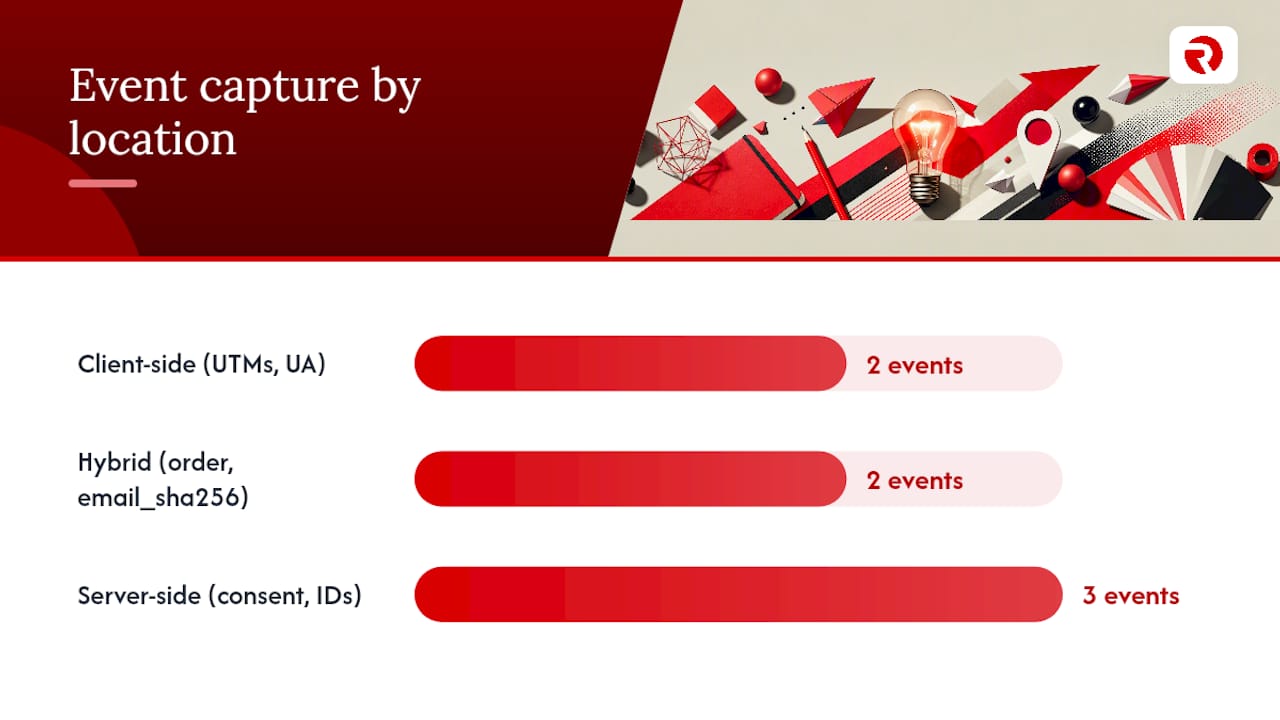
Fields like UTM parameters, user agent, and cookie state require browser capture. If you need them in a server-side event, you must collect them client-side and forward them explicitly in the payload. They do not exist on the server independently.
Event mapping guidance:
| Event type | Recommended capture | Required fields | Deduplication key |
|---|---|---|---|
| Pageview | Client-side | URL, referrer, user agent, UTMs, client_id | session_id + timestamp |
| Scroll depth | Client-side | URL, scroll %, session_id | session_id + depth |
| Purchase | Both (hybrid) | order_id, revenue, currency, email_sha256, consent_state | order_id (event_id) |
| Lead form submit | Both (hybrid) | form_id, email_sha256, phone_sha256, consent_state | form_id + timestamp |
| Sign-in | Server-side | user_id (hashed), timestamp, consent_state | user_id + session_id |
| Subscription start | Server-side | subscription_id, plan, revenue, email_sha256 | subscription_id |
| Billing webhook | Server-side | invoice_id, amount, currency, customer_id (hashed) | invoice_id |
Example purchase payload (server-side forwarding to Meta CAPI):
{
  "event_name": "Purchase",
  "event_id": "ord_20260312_abc123",
  "event_time": 1741787521,
  "action_source": "website",
  "user_data": {
    "em": ["b94d27b9934d3e08a52e52d7da7dabfac484efe04294e576b4b9c4b9c4b9c4b9"],
    "ph": ["1234567890abcdef..."],
    "client_ip_address": null,
    "client_user_agent": "Mozilla/5.0 ..."
  },
  "custom_data": {
    "currency": "GBP",
    "value": 149.99,
    "order_id": "ord_20260312_abc123"
  },
  "consent_state": "granted"
}
Note that client_ip_address is set to null here: the server strips the raw IP after any geolocation enrichment and never forwards it to Meta.
Security guidance:
- Always hash email and phone with SHA-256 before the payload leaves your application layer.
- Never forward raw PII to third-party vendor APIs.
- Avoid device fingerprinting as an identity method: it carries significant privacy risk and ICO scrutiny, and is technically unreliable across modern browsers. Hashed first-party identifiers with explicit consent are the correct approach.
Pro Tip: Use a single canonical hashing function across your stack. If your CRM hashes email differently from your server container, match quality at Meta and Google drops sharply. Standardise on lowercase, trimmed, SHA-256 before any system touches the value.
Is server-side tracking compliant with UK GDPR and PECR?
Server-side architecture does not change your legal obligations. It changes where processing happens, not whether you need a lawful basis for it.
Under UK GDPR, processing personal data for analytics or advertising requires either a legitimate interest assessment (rarely sufficient for ad tracking) or explicit consent. PECR (the Privacy and Electronic Communications Regulations) requires consent before storing or accessing information on a user’s device, which covers cookies and similar identifiers regardless of whether your tags run client-side or server-side. The ICO’s guidance on cookies and similar technologies is the authoritative reference for UK businesses.
Consent gating: how it works in practice
The sequence below shows how a compliant server-side setup enforces consent:
- User lands on your site. CMP loads and presents the consent banner.
- User grants or denies consent per category (analytics, advertising, personalisation).
- CMP writes consent state to a first-party cookie or data layer variable.
- Client-side code reads consent state and includes it in every event payload sent to your server endpoint.
- Server container reads
consent_statefrom the incoming payload. - Forwarding tags check consent before firing: if
advertising = denied, the Meta CAPI tag does not fire for that event. - Log entry records the event, consent state at time of processing, and which vendors received the event.
This sequence means consent is enforced at the server, not just assumed. A user who denies advertising consent will not have their purchase event forwarded to Meta, even though the event itself is captured for your own analytics.
UK GDPR compliance checklist for server-side implementations:
- Lawful basis documented for each processing activity (consent for ad tracking, legitimate interest for fraud prevention, etc.).
- CMP integrated and consent state passed to server with every event.
- DPAs in place with your server host, container vendor, and all downstream API destinations.
- Data retention policy set and enforced in server logs (typically 13 months maximum for analytics data under ICO guidance, shorter for raw event logs containing identifiers).
- Data flows documented in your Record of Processing Activities (ROPA).
- Server logs are immutable and exportable: owning the server endpoint gives you a verifiable audit trail that you can produce in response to a regulator query or a data subject access request.
A GDPR-compliant server-side setup typically requires CMP integration, documented data flows, DPAs for all recipients, and clear retention policies. Server-side helps you implement these controls reliably, but it does not achieve compliance on its own.
Pro Tip: Log the full consent state alongside every event in your server logs, not just a boolean. If a regulator asks what consent a user gave at the time of a specific transaction, you need the granular record, not just “consent was present”.
How do you test and monitor a server-side setup?
A server-side pipeline introduces new failure modes that browser DevTools cannot catch. Build a test plan before go-live and a monitoring layer that runs continuously in production.
Pre-launch testing checklist:
- Fire test events from a staging environment and inspect them in the server container’s preview logs. Verify all expected fields are present and correctly formatted.
- Check deduplication: fire the same event with the same
event_idfrom both client-side and server-side paths and confirm the platform counts it once. - Validate consent gating: set consent to denied for advertising and confirm no forwarding tag fires for that category.
- Use platform diagnostics: GA4 DebugView for GA4 events, Meta Events Manager for Conversions API events, and the Google Measurement Protocol validation endpoint for GA4 MP hits.
- Compare event counts against your existing client-side baseline over a 48-hour parallel run. Unexplained gaps indicate missing fields or misconfigured clients.
Production monitoring metrics:
- Event volume by source (client vs server) per event type, tracked daily.
- Deduplication rate: the percentage of events arriving at a platform that are flagged as duplicates. A rate above 20% suggests your
event_idlogic is inconsistent. - Error and retry rate on vendor API calls: sustained errors above 1–2% warrant investigation.
- Match quality score in Meta Events Manager: server-side events with hashed email and phone typically score 7–9 out of 10; a drop signals identifier quality issues.
- Forwarding latency: p95 latency on server-to-vendor calls; spikes can indicate vendor API issues or container resource constraints.
Pro Tip: Keep a short-term retention of raw incoming event logs (7–14 days) so you can replay failed or malformed events after fixing a bug. Without this, a misconfiguration during a peak trading period means permanent data loss.
Reconcile your server-side purchase events against your payment processor or CRM records weekly. If the counts diverge by more than a few percentage points, something in the pipeline is dropping or duplicating events.

Which tools should UK teams consider?
Google Tag Manager server-side (sGTM)
The most widely adopted server-side container for marketing teams. Runs on Google Cloud (or self-hosted via Docker), managed through the GTM interface. Best for teams already in the Google ecosystem. Hosting in europe-west2 keeps data in the UK. Engineering complexity: moderate. Check the GTM server-side documentation for official setup guides and the GTM support centre for preview and debug workflows.
Matomo (server-side) Open-source analytics platform with self-hosted and cloud options. Supports server-side SDKs, log import from web server access logs, and full data ownership. No data leaves your infrastructure unless you choose cloud hosting. Best for teams prioritising data sovereignty and GDPR simplicity. UK and EU cloud hosting available. Engineering complexity: low to moderate for the cloud version, higher for self-hosted. Official docs at matomo.org.
Segment (server-side sources) A customer data platform that accepts server-side event streams and routes them to 400+ destinations including data warehouses, CRMs, and ad platforms. Best for teams managing multiple data destinations who want a single event schema. UK data residency available on Business tier. Engineering complexity: moderate. Review the Segment client vs server guide before designing your taxonomy.
Meta Conversions API (CAPI)
Meta’s server-to-server API for sending conversion events directly from your server to Meta’s ad platform. Recovers attribution lost to ITP and ad blockers. Supports deduplication with browser pixel events via event_id. Best for any business running Meta ad campaigns at meaningful spend. No separate hosting required beyond your existing backend. Engineering complexity: low to moderate for direct integration, lower via sGTM template. Official docs at developers.facebook.com.
Managed implementation partners For teams without in-house engineering, specialist partners handle container deployment, CMP wiring, and ongoing monitoring. Valiz offers managed tagging and tracking implementations with a focus on privacy-compliant setups, worth evaluating if you want a delivered solution rather than a build-it-yourself project.
Should you implement server-side now, later, or not at all?
The decision is not binary. It depends on where data loss is costing you most.
Implement now if:
- You run paid media (Meta, Google Ads) at meaningful monthly spend and suspect significant attribution loss from ITP or ad blockers.
- You handle purchase or subscription events where data accuracy directly affects bidding and ROAS reporting.
- You have had a GDPR query or audit and need a stronger accountability record.
- You are already using GTM and have basic engineering support available.
Plan for later if:
- You are a small content site with minimal ad spend and no sensitive conversion events. The infrastructure cost outweighs the benefit.
- Your engineering team is at capacity. A poorly implemented server-side setup causes more data problems than it solves.
Probably not worth it if:
- You are a small blog or brochure site with no paid media and no e-commerce. Client-side analytics with a privacy-respecting tool (Matomo cloud, for example) is sufficient.
In-house vs agency: questions to ask before deciding
- Does your team have a developer who can configure DNS, TLS, and a cloud runtime?
- Do you have capacity to maintain the container, monitor logs, and respond to vendor API changes?
- Is your CMP already integrated with your tag management layer, or does that need to be built?
- Do you have a documented data flow and ROPA that a server-side implementation needs to update?
- What is the cost of data loss in your current setup, in terms of wasted ad spend or compliance risk?
If the answer to questions 1 and 2 is no, commissioning an agency or specialist partner is almost always faster and cheaper than an internal build that stalls halfway through.
An agency perspective on what actually matters
The most common mistake we see UK teams make is treating server-side tracking as a one-time migration rather than an ongoing data infrastructure decision. Teams spend weeks getting the container live, then discover three months later that a CMP update broke consent gating, or that a vendor API change silently stopped forwarding events. The pipeline needs ownership, not just a launch.
On timelines: a realistic sGTM implementation for a mid-size e-commerce site, from scoping to production, runs four to eight weeks. That includes DNS configuration, CMP wiring, event mapping, parallel testing, and a two-week monitoring period before decommissioning client-side conversion tags. Rushing the parallel testing phase is where most data-loss incidents originate.
On uplift expectations: the measurement improvement from server-side is real but varies significantly by audience. Sites with a high proportion of Safari users or privacy-conscious audiences in the UK tend to see the largest recovery in attributed conversions, because ITP has been aggressively limiting third-party cookie lifetimes for years. Sites with a predominantly Chrome desktop audience on Windows may see a more modest initial uplift, though the resilience benefit remains as browser privacy defaults continue tightening.
The staging advice we give every client: run client-side and server-side in parallel for at least two weeks before switching off any client-side conversion tags. Use that window to reconcile event counts, validate deduplication, and confirm consent gating works correctly across all CMP scenarios. Cutting that window short to hit a deadline is the single most reliable way to introduce double-counting or data gaps that take months to unpick.
How Radkaadvertising can help you get this right
Getting server-side tracking live is one thing. Getting it right, compliant, and maintainable is another. Radkaadvertising delivers end-to-end server-side implementations for UK businesses, from initial tracking audit through to production monitoring, so your data infrastructure is built to last rather than patched together.
Our typical server-side engagement covers:
- Tracking audit: mapping your current event gaps, blocker impact, and consent configuration before a single line of code changes.
- sGTM or direct API implementation: container deployment, DNS/TLS setup, CMP integration, and vendor forwarding configuration.
- Event mapping and payload design: defining which events go where, with deduplication and hashing built in from day one.
- Compliance documentation: updating your ROPA, DPA schedule, and retention policies to reflect the new architecture.
- Monitoring and ongoing support: dashboards, alerting, and a named contact when vendor APIs change or consent logic needs updating.
Engagements typically run six to twelve weeks for a full implementation, with retainer options for ongoing governance. To see the kind of outcomes we deliver, browse our client case studies or get in touch at Radkaadvertising to discuss your specific setup.
Sources
- Server-side tracking: the complete guide for marketers | iubenda
- An introduction to server-side tagging | Google Tag Manager
- What is server-side tracking? | Matomo blog
- Server-Side vs Client-Side Tracking: 2026 Decision Guide | Analytics Alternatives
FAQ
What is server side tracking?
Server side tracking is a measurement architecture where your website sends events to a server you control, which then forwards them to analytics and ad platforms via server-to-server API calls, bypassing the browser entirely for the forwarding step.
What is the server-side tracking process?
The browser captures an event and posts it to your first-party server endpoint; the server validates, enriches, and checks consent state; then it forwards the event to permitted destinations such as GA4 or Meta CAPI via server-to-server calls.
Is server-side tracking legal under UK law?
Yes, when implemented correctly. Server-side tracking is legal under UK GDPR and PECR provided you obtain valid consent before processing personal data or device identifiers, enforce that consent at the server, and have DPAs in place with all data recipients.
What is server-side tracking for Google Tag Manager?
Google Tag Manager’s server-side container (sGTM) receives events at a first-party subdomain you configure, applies transformation and consent logic, and forwards events to GA4, Google Ads, Meta, and other platforms without vendor JavaScript running in the browser.
When should you hire an agency for server-side tracking?
If your team lacks a developer who can configure DNS, TLS, and a cloud runtime, or cannot commit to ongoing monitoring and vendor API maintenance, commissioning a specialist agency or partner is faster and more reliable than an internal build. Radkaadvertising handles the full scope from audit to production for UK clients.