Three hour Google Ads audit checklist for UK marketers: tracking first

A Google Ads audit is a time-boxed, top-to-bottom review that verifies tracking first, then hunts down wasted spend and missed opportunities across settings, keywords, bidding and creative. Run properly, it produces a severity-ranked list of fixes rather than a vague sense that “something’s off.” Expect to spend a few hours on a mid-sized account and walk away with a prioritised action plan you can start executing the same day.
TL;DR:
- Properly verifying conversion tracking early on is essential, as broken data can lead to flawed subsequent optimizations and wasted spend.
- Audits should begin with tracking verification before addressing account structure, keywords, bidding, or creative assets to ensure decisions are based on accurate data.
- Confirm account settings like location targeting, network exposure, and auto-applied recommendations to prevent budget leakage and campaign overlap.
- Regularly review search terms, negative keywords, and segmentation data to identify and eliminate irrelevant or duplicate traffic that inflates costs.
- Use severity scoring and prioritize fixes like tracking issues and budget pacing to maximize impact within the first 30 days.
Table of Contents
- What is a Google Ads audit checklist, step by step?
- Is your conversion tracking actually trustworthy?
- Are your account settings quietly leaking budget?
- How do you clean up search terms and negatives?
- Do your bidding strategy and budget actually match reality?
- Do your ads and landing pages actually match?
- Which segments reveal hidden waste?
- How do you turn findings into a fix plan?
- Which free tools are worth using, and what do they miss?
- Why Radka Advertising can help: proof points and next steps
- An editorial take on where most audits go wrong
- Get a managed audit from Radka Advertising
- Sources
- FAQ
What is a Google Ads audit checklist, step by step?
The order matters more than most marketers realise. Fix creative before tracking, and you’ll optimise against numbers that are already wrong. That’s why every credible audit sequence starts with conversion data and only then moves outward to structure, keywords, bidding and ads.
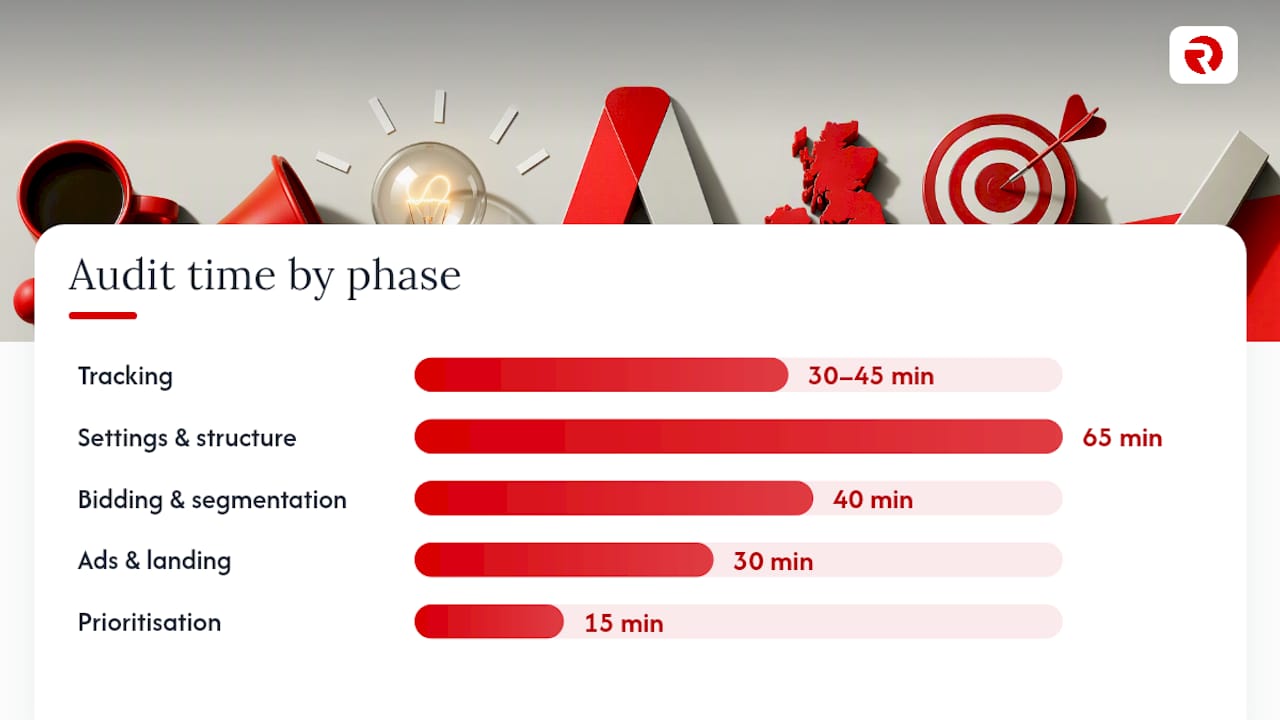
Here’s the sequence, with realistic time estimates for a small to mid-sized account (five to fifteen campaigns):
- Conversion tracking verification (30–45 minutes) — confirm every conversion action fires correctly and matches CRM records.
- Account settings and network exposure (15 minutes) — locations, languages, Search Partners, Display expansion.
- Search terms and negative keywords (30 minutes) — mine the last 30–90 days for waste and duplication.
- Account structure and ad group themes (20 minutes) — check for overlap and intent confusion.
- Bidding strategy and budget pacing (20 minutes) — assess whether Smart Bidding has enough signal.
- Ads, assets and landing pages (30 minutes) — relevance, asset coverage, mobile speed.
- Segmentation: device, geo, time, Performance Max (20 minutes) — surface hidden waste and channel leakage.
- Prioritisation and reporting (15 minutes) — rank findings by severity and draft the fix plan.
That totals roughly three hours for a well-organised account, closer to four if you’re auditing something with years of accumulated clutter. A 10-step ex-Googler process follows the same tracking-first logic, and for good reason: audits that start anywhere else routinely find that half their earlier findings were built on broken data.
Time-box each step. If conversion tracking takes longer than 45 minutes because something’s genuinely broken, stop the clock, note it as critical, and keep moving. You can return to fix it once the full picture is mapped.
Is your conversion tracking actually trustworthy?
This is where most Google Ads audits either earn their keep or become a waste of an afternoon. If your tracking misreports what’s happening, every downstream decision, from bid strategy to budget allocation, gets built on sand.
Start by mapping business conversion actions and ranking them. A lead form submission and a newsletter signup are not the same thing, yet plenty of accounts weight them identically in Smart Bidding, which quietly chases the wrong outcome.
What to check, in order:
- Fire each conversion trigger manually and confirm it appears in Google Ads within the expected window.
- Cross-reference conversion counts against CRM or e-commerce backend data for the same date range.
- Check for double-counting, particularly on multistep forms or accounts running both GA4 imports and native tags.
- Test Consent Mode v2 behaviour for UK and EEA traffic, since consent gating on
ad_storagecan silently suppress conversion data without throwing an error. - Review enhanced conversions match-rate diagnostics inside the conversion action settings.
Platform changes in 2026 to how GA4 and enhanced conversions pass hashed data into Google Ads have made this step more important, not less. According to MarqOps’ 2026 checklist, consent gating and enhanced conversion updates can break flows quietly, with no error message, just a gradual drop in recorded conversions that looks like a performance issue rather than a tracking one.
Silent failures rarely announce themselves. A tag manager update, a cookie banner redesign or a checkout page change can each break tracking without any visible symptom for days. Give any fix 48 to 72 hours before trusting the corrected numbers, since Google Ads reports conversions on a delay and needs a full attribution window to settle.
Pro Tip: Run a test purchase or lead submission the moment you finish a tracking fix, then check back in three days. If the number doesn’t show up by then, the fix didn’t work, no matter how confident the implementation looked.
Audits that skip straight to keywords and bidding without this step are optimising blind. Little Dragon Media’s framework makes tracking the first checkpoint precisely because every other finding depends on it being right.
Are your account settings quietly leaking budget?
Account-level settings rarely get a second look after launch, which is exactly why they’re such a common source of wasted spend. A location setting misconfigured three years ago can still be bleeding budget today.
Work through these checks:
- Confirm location targeting uses “presence” rather than “presence or interest” unless you genuinely want to reach people searching about your area from elsewhere.
- Check whether Search Partners and Display Network expansion are switched on for search campaigns, since both can dilute quality without a clear warning.
- Review any auto-applied recommendations Google has silently accepted. These roll out under default account settings and can shift bidding, budgets or ad copy without an obvious flag.
- Look for overlapping campaigns targeting the same keywords or audiences, which forces you to compete against yourself in the auction.
- Check ad group and campaign naming conventions for intent separation. If “Brand,” “Generic” and “Competitor” traffic all sit in one ad group, you cannot control bids or budgets by intent.
- For Performance Max and AI Max campaigns, verify brand exclusions are in place and that search theme signals actually reflect your product catalogue, not a generic starting point.
Google’s own campaign diagnostics tool checks over 90 signals across account, ads, audience, bidding and budget categories, surfacing serving issues with a direct links to the fix. It’s worth running before you start manual checks, since it flags configuration problems you’d otherwise spend twenty minutes hunting for by hand.
How do you clean up search terms and negatives?
The search terms report is where the clearest evidence of wasted spend usually sits, and it’s often the most neglected part of an ongoing account.
Pull the report for a recent period, sort by cost descending, and scan the top terms for anything that doesn’t match buying intent. Terms containing “free,” “jobs,” “how to,” or a competitor’s brand name are common offenders that rarely convert but happily burn budget.
- Add negatives at the shared list level so they apply account-wide, not just to one campaign.
- Flag near-duplicate keywords across ad groups, since these compete against each other in the same auction and inflate CPCs for no benefit.
- Match your keyword strategy to conversion volume: broad match plus Smart Bidding needs roughly 30 conversions a month per campaign to work reliably; below that, phrase or exact match with manual oversight tends to perform more predictably.
- Check whether any exact-match keyword has effectively become redundant because a broad-match keyword in the same ad group is already capturing the same queries.
Pro Tip: Sort the search terms report by cost, not clicks. A term with five clicks and zero conversions at £40 each tells you far more than one with fifty clicks and a low CPC.
Do your bidding strategy and budget actually match reality?
Smart Bidding works brilliantly with sufficient data and badly without it. The audit’s job is to work out which situation you’re in.
- Check conversion volume per campaign. Below a modest conversion volume per month, Smart Bidding algorithms lack the signal to optimise reliably, and you’ll see erratic CPA swings as a result.
- Pull the Lost Impression Share report and split it into “lost to budget” versus “lost to rank.” Budget-constrained campaigns need more spend or tighter targeting; rank-constrained ones need bid or Quality Score improvements.
- Match bidding strategy to campaign intent. A brand-awareness campaign optimised for Maximise Conversions will chase cheap, low-value actions rather than reach.
- Check budget pacing against the delivery graph. Campaigns that exhaust budget by midday are missing afternoon and evening demand entirely.
- Look for target CPA or ROAS values set arbitrarily rather than derived from historical account data, a common cause of underdelivery.
Fixing pacing is often the fastest win in the entire audit: raising a budget cap or loosening an unrealistic target CPA can restore lost volume within 24 hours, well before any creative or structural changes take effect.
Do your ads and landing pages actually match?
Disconnected messaging between ad copy and landing page is one of the quickest ways to torch Quality Score and conversion rate simultaneously, yet it’s rarely caught because the ad and the page are usually built by different people at different times.
- Check message match. The headline, offer and call to action in the ad should appear, in some recognisable form, above the fold on the landing page.
- Audit asset coverage. Confirm sitelinks, callouts, structured snippets and lead form extensions are populated at both account and campaign level, since missing assets reduce ad rank and visible real estate.
- Test mobile load speed. Anything over three seconds on mobile is costing you conversions before the page even finishes rendering.
- Check the form itself. Count the fields. Every field beyond the essential few reduces completion rate, particularly on mobile.
Quality Score problems almost always trace back to one of these four issues rather than the keyword itself. A landing page mismatch shows up as a low “landing page experience” component score, while poor message match tends to depress expected click-through rate instead.
Pro Tip: Run one A/B test at a time. Changing the headline and the form length simultaneously means you’ll never know which change actually moved the conversion rate.
Radka Advertising’s asset and landing-page audit approach treats creative and conversion pages as one connected system rather than separate deliverables, which is closer to how Google’s own Quality Score actually weighs them.
Which segments reveal hidden waste?
Aggregate campaign numbers hide almost as much as they reveal. Segmenting by device, geography and hour of day routinely uncovers spend patterns that look invisible at the campaign level.
- Pull device segmentation and compare conversion rate, not just cost, across desktop, mobile and tablet.
- Break out geography to the town or postcode level rather than trusting the regional average, since performance often varies sharply within a single campaign’s target area.
- Check hour-of-day and day-of-week data against your actual business hours, particularly for lead generation accounts where after-hours enquiries convert at a different rate.
- Review Auction Insights for sudden competitor entries or share-of-voice shifts that coincide with performance changes.
For Performance Max specifically, check the channel distribution report for spend concentration in Display or YouTube when your goal is search intent, and confirm brand exclusions are stopping the campaign from simply capturing branded traffic you’d have won for free. Recent asset-level and channel reporting updates have made this kind of PMax audit possible in a way it simply wasn’t a couple of years ago. It’s worth cross-checking a sample of platform-reported conversions against your CRM too, since automated bidding can occasionally count events that never translate into real business value.
How do you turn findings into a fix plan?
An audit that ends in a list of problems without a priority order is just a longer way of saying “everything’s broken.” Score every finding by severity and business impact before you present anything.
- Critical: broken or missing conversion tracking, consent-mode failures, budget-capped high-performing campaigns.
- High: keyword duplication driving up CPCs, mismatched bidding strategy, poor message match on top-spend ads.
- Medium: missing assets, unoptimised ad schedules, thin negative keyword lists.
- Low: naming convention cleanup, minor extension gaps, cosmetic structure improvements.
A sample 30/60/90 plan: fix tracking and consent issues in the first 30 days, rebuild negative keyword lists and adjust bidding by day 60, and tackle structural rework, like splitting overlapping campaigns, by day 90. Assign an owner and one KPI per phase (conversion rate, CPA, or impression share) so progress is measurable rather than anecdotal. This kind of severity scoring, as recommended in aubado’s audit checklist, keeps stakeholders focused on the fixes that actually move revenue first.
Which free tools are worth using, and what do they miss?
Free graders earn their place as a fast triage step, not a substitute for the manual checks above. They’re good at flagging obvious configuration gaps; they’re poor at judging whether your conversion mapping actually reflects your business.
- Google’s own campaign diagnostics surfaces serving issues directly inside the platform, no third-party tool required.
- Third-party graders typically score CTR, CPC, conversion rate, Quality Score and impression share against benchmark ranges, as outlined in MetricNexus’s grader guide.
- AI-assisted audit tools can cut manual review time significantly when used to flag anomalies before a human reviews them.
Seven quick wins worth implementing the same day: add negative keywords from top wasted-spend terms, fix any broken conversion trigger, raise a budget cap on a rank-constrained campaign, tighten geo-targeting to “presence,” add missing sitelink assets, pause a Display-expanded search campaign leaking budget, and set brand exclusions on Performance Max. None of these require a full rebuild, and together they tend to address the bulk of near-term waste. Combine tool output with the manual checks above; automated scores flag the symptom, but only account-level audit frameworks that blend tool data with human judgement catch the business-specific cause.
Why Radka Advertising can help: proof points and next steps
Running through this checklist yourself will catch most of the obvious waste. What it won’t always catch is the deeper structural work: rebuilding account architecture around genuine intent groups, reconciling attribution across GA4 and CRM systems, or restructuring Performance Max around verified search themes rather than default settings.
A self-audit tells you what’s broken. A managed audit tells you why it broke, what it’s costing you in pounds per month, and exactly how the fix should be sequenced against your commercial calendar.
Radka Advertising’s paid media team has applied this same tracking-first, severity-ranked approach across client accounts spanning UK and Eastern European markets, documented in the agency’s case studies. A managed audit goes beyond the checklist stage: it includes CRM reconciliation, competitor benchmarking inside Auction Insights, and a implementation plan the agency can execute directly rather than hand back as a to-do list.
An editorial take on where most audits go wrong
Most published audit guides treat every checklist item as equally urgent, which is exactly backwards. The research here points clearly in one direction: tracking and consent behaviour deserve disproportionate attention, because 2026’s Consent Mode and enhanced conversion changes make silent data failure more likely than it’s been in years, not less.
The conventional advice, “check settings, then keywords, then bidding, then ads,” undersells how much time should go into verifying that the numbers you’re about to act on are real. A beautifully restructured account built on broken conversion data is still a broken account; it’s just better organised now.
What the reader should actually prioritise: spend disproportionate time on the tracking step, even if it means rushing the naming-convention cleanup. Nobody ever recovered wasted budget from a tidy ad group name. They recovered it by discovering that half their reported conversions weren’t real, or that a fifth of them had stopped arriving three weeks earlier without anyone noticing.
— Bart
Get a managed audit from Radka Advertising
Running the checklist above yourself is the right first move, but a self-audit has a ceiling: it tells you what’s broken, not always why, and it rarely comes with the hands to fix it. Radka Advertising is the practical next step once your own review surfaces more than you can comfortably rebuild alone, particularly for accounts spanning UK and Eastern European markets where consent rules and bidding signal vary by geography.
The agency’s paid media work sits inside a wider full-service offering covering brand strategy, digital marketing and content, so fixes get implemented in context rather than in isolation from your wider marketing. If your audit turned up tracking gaps, structural overlap or a Performance Max campaign quietly leaking budget into Display, book a conversation about a managed Google Ads audit and get a prioritised fix plan actioned rather than just written down.
Sources
- About campaign diagnostics - Google Ads Help
- How to Audit Your Google Ads Account (+ Free Grader Tool) | MetricNexus
- Google Ads Audit: The 2026 Checklist | MarqOps
FAQ
How do you do a Google Ads audit?
Start with conversion tracking verification, then work outward through account settings, search terms, structure, bidding and ads and landing pages, using the ordered checklist above and scoring each finding by severity.
Is £10 a day enough for Google Ads?
A daily budget that small usually can’t generate the 15-30 monthly conversions Smart Bidding needs to optimise reliably, so expect slower learning and less predictable results than with a higher budget or a manual bidding strategy.
Does Google offer its own audits?
Google Ads includes a built-in campaign diagnostics tool that checks over 90 signals and flags serving issues directly, though it doesn’t replace a full manual or agency audit of strategy and business goals.
How much does Google Ads charge per 1,000 impressions?
Cost per thousand impressions (CPM) varies enormously by industry, network and campaign type, so there’s no single reliable figure. Your own account’s impression data, reviewed during the segmentation step of an audit, is a far more useful benchmark than any generic average.
How often should you audit a Google Ads account?
Most practitioners recommend a full audit quarterly, with lighter monthly checks on search terms, pacing and tracking to catch problems before they compound.